
01.1
End-to-end automation
Model automations across lead capture, service delivery, billing, and procurement in a single canvas. No hand-off gaps, no manual triggers.
Multiple modules. One shared data model. Zero duct tape.
From Architect to Templates, Stravere gives your team one operating system for designing workflows, measuring outcomes, guiding shifts, and launching faster. Every module shares the same live data — so nothing falls through the gaps between tools.
Architect is where intelligent automation becomes reality. It's a purpose-built canvas for designing, deploying, and scaling AI-powered workflows across every corner of your MSP operations — without asking your operators to write code, configure integrations by hand, or stitch tools together manually.
Model complete end-to-end automations. Encode your client SLAs, priority tiers, and business rules into logic that runs without human intervention. See every branch, trigger, and handoff clearly so your team knows exactly what the AI is doing in production — and trusts it.
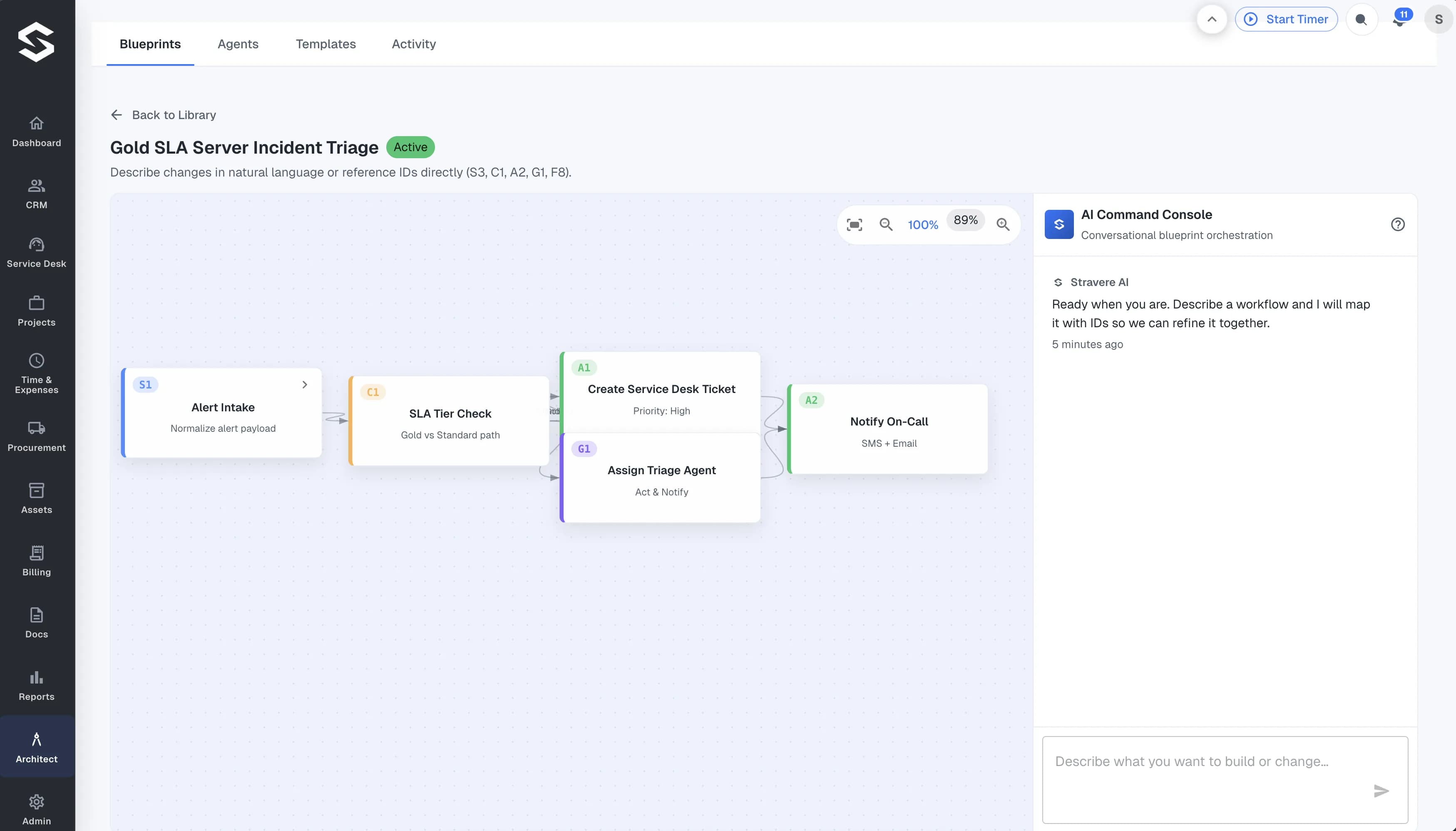
Model automations across lead capture, service delivery, billing, and procurement in a single canvas. No hand-off gaps, no manual triggers.
Encode client priority, SLA expectations, and business rules into AI-driven decision branches before work goes live. What the AI does is defined by your rules, not guesswork.
Every trigger, branch, and handoff is visible in the Architect interface. Teams can audit what automation ran, when, and why — so they can trust the system and improve it over time.
Never push a workflow live and hope for the best. Never wait until end-of-month to find out a contract is underwater. Stravere's built-in evaluation and reporting tools let your team interrogate performance with plain-English questions, compare outcomes over time, and automate recurring report delivery — all against live MSP data, with no exports, no lag, and no waiting on a data team.
Reports isn't a bolt-on analytics module. It's built into the same operational data model that powers the Shift Coach, Architect, and every other part of Stravere — which means the numbers you see in a report are the same numbers driving your AI recommendations.
Interrogate your operational data instantly with the same questions your team asks every day. No SQL. No pivot tables. Type the question, get the answer.
Compare margins, utilization, and SLA risk across billing periods so that changes in performance are measurable, not just observable.
Schedule recurring reports to the right stakeholders — owner, ops lead, account manager — without manual follow-up or end-of-month scrambles.
The AI Shift Coach doesn't wait to be asked. It continuously monitors your operational data across billing, time entries, agreements, and procurement — and surfaces the highest-impact actions for each operator, ranked by urgency and business risk.
It's not a notification center. It doesn't send you a summary at 5pm. It's active every minute of every shift, watching for the signals that matter most and telling your operators exactly what to do next — before those signals become problems that reach your clients.
Continuously rank work by business impact and SLA pressure. Operators open their shift knowing exactly what to do first — not guessing based on ticket age or inbox order.
Combine signals from Time & Expenses, Billing, and Procurement into one operator-ready decision surface. No more toggling between modules to piece together the picture.
Every Shift Coach recommendation is grounded in the same live operational model that powers Architect, Reports, and the rest of Stravere. One source of truth, no stale data.
Your first automation shouldn't take weeks to build. And your tenth shouldn't require starting from a blank canvas. Architect Templates gives your team a growing library of pre-built, MSP-ready workflow blueprints — covering the processes you need to automate today, with the flexibility to extend them for how your specific MSP operates.
Install a template. Extend it through AI conversation. Go live fast. No professional services engagement. No implementation backlog. Just a faster path from idea to production automation.
Start from templates built and tested for MSP workflows. Every blueprint installs as a working automation — not a skeleton you still have to finish building.
Adapt any template to your specific clients, agreements, and rules through AI conversation inside Architect — without rebuilding from scratch every time your requirements change.
In-product guides, complexity ratings, and onboarding resources support your team at every step — so building automation capability becomes part of how your MSP grows, not a one-time project.
We'll walk you through a 30-minute platform session covering all four modules against real MSP operational data. Ask anything. See everything.